Consultancy resource management software
Staff projects with the right people, instantly. Match required roles to available consultants by skill, seniority and availability, without spreadsheet gymnastics.
Overview
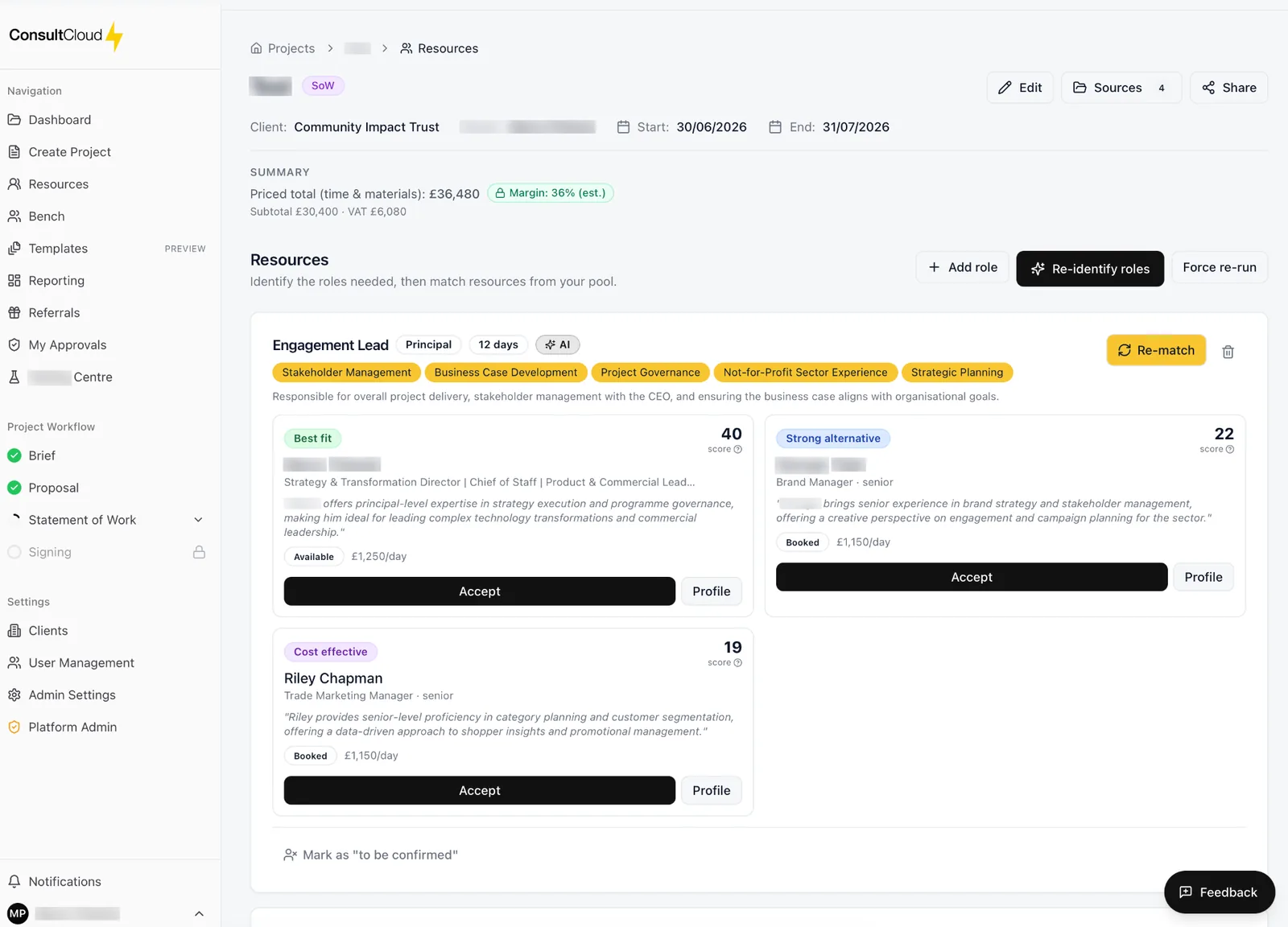
Every SoW in ConsultCloud is linked to its required roles. The platform suggests the best matched consultants from your bench, surfaces conflicts before they happen and protects your utilisation targets.
Skill-aware matching
Search across the skills your firm actually delivers.
Availability first
Never commit to a consultant who's already booked.
Utilisation insight
See the impact of every allocation on team load.
Why resource management software
Committing named consultants before checking their availability is one of the most common ways a consulting project starts badly. In most firms the bench lives in a spreadsheet that is out of date by the time anyone reads it. ConsultCloud links every SoW to its required roles and matches those roles to the people you actually have, by skill, seniority, rate and availability, before you commit.
How it works
Define the roles
Every proposal and SoW carries the roles it needs.
Get matched consultants
ConsultCloud suggests the best-matched people from your bench using their skills, seniority, rate and availability.
See conflicts early
Clashes with existing bookings surface before you promise a name to a client.
Allocate and check the load
See how each allocation affects team utilisation.
Carry it into the SoW
Allocated roles, days and rates flow into the Statement of Work's Team & Resourcing and commercials sections.
What's included
Skills repository
Record the skills your firm actually delivers and search across them.
Resource profiles
Each consultant's skills, seniority and rate in one place.
Availability first
Avoid committing someone who is already booked.
Utilisation insight
Understand the impact of every allocation on team load.
Reporting
Pipeline, utilisation and margin visibility across the firm.
Connected to commercials
Staffing and pricing come from the same data.
Common questions
- What is consultancy resource management software?
- Software that tracks who is available, what they can do and what they cost, and uses that to staff projects. ConsultCloud does this inside the same workflow that produces your proposals and SoWs.
- How does matching work?
- Each role on a project is compared against your consultants' skills, seniority, rate and availability, and the best matches are suggested.
- Can we use our own skills list?
- Yes. The skills repository holds the skills your firm delivers, and matching searches across them.
- How does resourcing connect to the SoW?
- The roles, days and rates you allocate appear in the SoW automatically, so the document and the staffing plan always agree.
- Do we still need our resourcing spreadsheet?
- ConsultCloud keeps each consultant's skills, seniority, rate and availability on their resource profile, so matching runs from one current source rather than a spreadsheet copied between people.
- Can we see utilisation across the firm?
- Yes. Reporting gives pipeline, utilisation and margin visibility across the firm, and each allocation shows its effect on team load before you confirm it.
- How do consultant rates feed into pricing?
- Each consultant's rate sits on their resource profile. When a role is matched, the rate travels with it into the proposal and Statement of Work commercials.
- Can I try it first?
- Yes. The free trial lasts 7 days or 3 completed workflows, whichever comes first. A workflow counts when its SoW is signed.
Ready to win more consulting work?
Start your free trial today. Cancel anytime before it ends.